上一篇整理了Dispatcher的使用方式, 这一篇窥探一下Dispatcher的内部机制.
1 | //https://msdn.microsoft.com/en-us/library/system.windows.application(v=vs.110).aspx |
app.Run()层层调用, 最后会到达Dispatcher.Run();
1 | //Dispatcher.cs |
出现了GetMessage和TranslateAndDispatchMessage, 后者将消息派发到窗口的消息处理函数中(WndProcHook)
1 | //Dispatcher.cs |
当收到的消息为_msgProcessQueue时, 调用的是ProcessQueue方法. ProcessQueue方法从DispatcherQueue里面(PriorityQueue
那么WndProcHook是在哪里被注册的呢? 看Dispatcher的构造方法1
2
3
4
5
6
7
8
9
10
11
12
13
14
15
16
17
18
19
20
21
22
23
24
25
26private Dispatcher()
{
_queue = new PriorityQueue<DispatcherOperation>();
_tlsDispatcher = this; // use TLS for ownership only
_dispatcherThread = Thread.CurrentThread;
// Add ourselves to the map of dispatchers to threads.
lock(_globalLock)
{
_dispatchers.Add(new WeakReference(this));
}
_unhandledExceptionEventArgs = new DispatcherUnhandledExceptionEventArgs(this);
_exceptionFilterEventArgs = new DispatcherUnhandledExceptionFilterEventArgs(this);
_defaultDispatcherSynchronizationContext = new DispatcherSynchronizationContext(this);
// Create the message-only window we use to receive messages
// that tell us to process the queue.
MessageOnlyHwndWrapper window = new MessageOnlyHwndWrapper();
_window = new SecurityCriticalData<MessageOnlyHwndWrapper>( window );
_hook = new HwndWrapperHook(WndProcHook);
_window.Value.AddHook(_hook);
}
_msgProcessQueue是什么时候被放入消息队列中的? 搜了一下代码, 只一处有:1
2
3
4
5
6
7
8
9
10
11
12
13
14
15
16
17
18
19
20
21private bool RequestForegroundProcessing()
{
if(_postedProcessingType < PROCESS_FOREGROUND)
{
// If we have already set a timer to do background processing,
// make sure we stop it before posting a message for foreground
// processing.
if(_postedProcessingType == PROCESS_BACKGROUND)
{
SafeNativeMethods.KillTimer(new HandleRef(this, _window.Value.Handle), TIMERID_BACKGROUND);
}
_postedProcessingType = PROCESS_FOREGROUND;
// We have foreground items to process.
// By posting a message, Win32 will service us fairly promptly.
return UnsafeNativeMethods.TryPostMessage(new HandleRef(this, _window.Value.Handle), _msgProcessQueue, IntPtr.Zero, IntPtr.Zero);
}
return true;
}
查找RequestForegroundProcessing被调用的过程为, InvokeAsyncImpl调用RequestProcessing, RequestProcessing调用CriticalRequestProcessing
看看InvokeAsyncImpl的实现1
2
3
4
5
6
7
8
9
10
11
12
13
14
15
16
17
18
19
20
21
22
23
24
25
26
27
28
29
30
31
32
33
34
35
36
37
38
39
40
41
42
43
44
45
46
47
48
49
50
51
52
53
54
55
56
57
58
59
60
61
62
63
64
65
66
67
68
69
70
71
72
73/// <SecurityNote>
/// Critical:This code causes arbitrary delegate to execute asynchronously, also calls critical code.
/// </SecurityNote>
[]
private void InvokeAsyncImpl(DispatcherOperation operation, CancellationToken cancellationToken)
{
DispatcherHooks hooks = null;
bool succeeded = false;
// Could be a non-dispatcher thread, lock to read
lock(_instanceLock)
{
if (!cancellationToken.IsCancellationRequested &&
!_hasShutdownFinished &&
!Environment.HasShutdownStarted)
{
// Add the operation to the work queue
operation._item = _queue.Enqueue(operation.Priority, operation);

// Make sure we will wake up to process this operation.
succeeded = RequestProcessing();
if (succeeded)
{
// Grab the hooks to use inside the lock; but we will
// call them below, outside of the lock.
hooks = _hooks;
}
else
{
// Dequeue the item since we failed to request
// processing for it. Note we will mark it aborted
// below.
_queue.RemoveItem(operation._item);
}
}
}
if (succeeded == true)
{
// We have enqueued the operation. Register a callback
// with the cancellation token to abort the operation
// when cancellation is requested.
if(cancellationToken.CanBeCanceled)
{
CancellationTokenRegistration cancellationRegistration = cancellationToken.Register(s => ((DispatcherOperation)s).Abort(), operation);
// Revoke the cancellation when the operation is done.
operation.Aborted += (s,e) => cancellationRegistration.Dispose();
operation.Completed += (s,e) => cancellationRegistration.Dispose();
}
if(hooks != null)
{
hooks.RaiseOperationPosted(this, operation);
}
if (EventTrace.IsEnabled(EventTrace.Keyword.KeywordDispatcher | EventTrace.Keyword.KeywordPerf, EventTrace.Level.Info))
{
EventTrace.EventProvider.TraceEvent(EventTrace.Event.WClientUIContextPost, EventTrace.Keyword.KeywordDispatcher | EventTrace.Keyword.KeywordPerf, EventTrace.Level.Info, operation.Priority, operation.Name, operation.Id);
}
}
else
{
// We failed to enqueue the operation, and the caller that
// created the operation does not expose it before we return,
// so it is safe to modify the operation outside of the lock.
// Just mark the operation as aborted, which we can safely
// return to the user.
operation._status = DispatcherOperationStatus.Aborted;
operation._taskSource.SetCanceled();
}
}
先将operation加入queue, 然后调用RequestProcessing, 发出_msgProcessQueue.1
2
3
4
5// Add the operation to the work queue
operation._item = _queue.Enqueue(operation.Priority, operation);
// Make sure we will wake up to process this operation.
succeeded = RequestProcessing();
另一处RequestProcessing是在processQueue中调用, 假如queue中还有其他operation1
2// If there is more to do, request processing for it.
RequestProcessing();
以上过程, 大致可以用下面这幅图联系起来http://www.cnblogs.com/powertoolsteam/archive/2010/12/31/1922794.html#2007193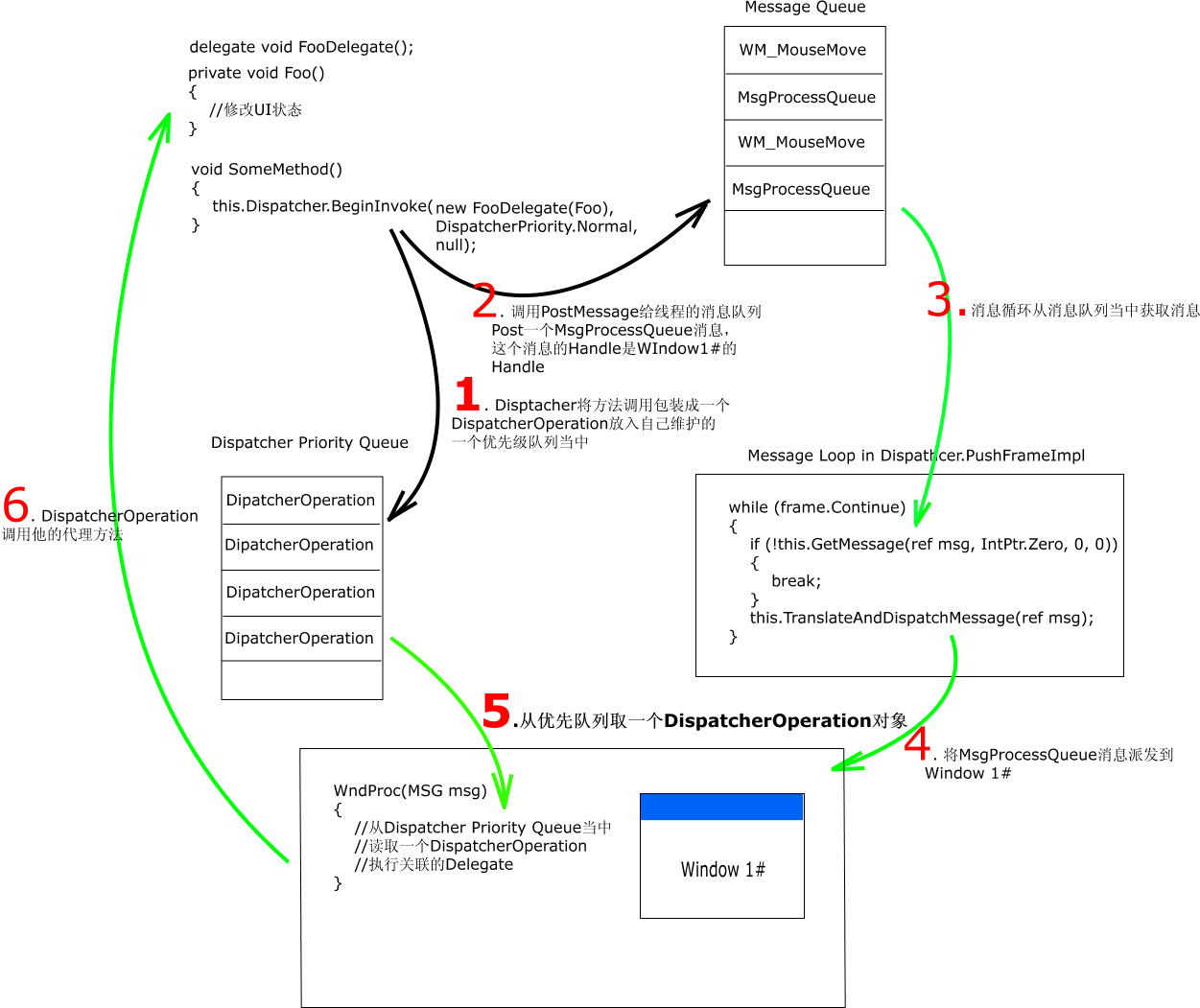
从上图可以看到Dispatcher在调用BeginInvoke之后所经历的流程.
将调用的Delegate和优先级包装成一个DispatcherOperation放入Dispatcher维护的优先级队列当中, 这个Queue是按DispatcherPriority排序的, 高优先级的DispatcherOperation先被处理
往当前线程的消息队列中Post一个名为MsgProcessQueue的Message。这个消息是WPF自己定义的,见Dispatcher的静态构造函数当中的_msgProcessQueue = UnsafeNativeMethods.RegisterWindowMessage(“DispatcherProcessQueue”); 这个消息被Post到消息队列之前,还要设置MSG.Handle,这个Handle就是Window 1#的Handle. 指定Handle是为了在消息泵派发消息的时候,指定哪个窗口的WndProc(窗口过程)处理这个消息. 在这里所有BeginInvoke引起的消息都是Window1#的窗口过程来处理的.见return UnsafeNativeMethods.TryPostMessage(new HandleRef(this, _window.Value.Handle), _msgProcessQueue, IntPtr.Zero, IntPtr.Zero);
消息泵读取消息
系统根据消息的Handle, 发现跟Window1#的Handle相同,然后将这个消息派发到Window1#的窗口过程,让其处理
在窗口过程中,调用ProcessQueue方法, 从优先级队列中取出一个优先级最高的DispatcherOperation
执行DispatcherOperation.Invoke方法. Invoke方法的核心就是调用DispatcherOperation构造时传入的Delegate, 也就是Dispatcher.BeginInvoke传入的Delegate. 最终这个Foo()方法被执行了
小结如下, 每Invoke或者BeginInvoke
- 放一个DispatcherOperation到PriorityQueue
中 - 放一个_msgProcessQueue到消息队列中
- GetMessage从消息队列中取出_msgProcessQueue, 派发到窗口过程, 窗口过程调用ProcessQueue, 从PriorityQueue
中取出DispatcherOperation, 然后执行